



AI has arrived in law firms – not as a gimmick, but as a tool to handle time pressure, rising client expectations, and the growing mountain of documents. At the same time, the topic is sensitive: if you work with confidential client materials, you cannot just use any tool. That is why a sober view matters: what does AI mean for lawyers in day-to-day practice, which use cases deliver real value, and which requirements must be met so that adoption remains compatible with data protection and attorney–client privilege?
What does AI for lawyers actually mean?
When lawyers look for AI, it is rarely about theory. Most of the time, they mean software that speeds up or stabilizes legal work by analyzing text, structuring it, generating suggestions, or making information easier to find.
In practice, most applications fall into three functional categories:
First, analysis and structuring: the AI reads one document or many documents and extracts what matters, such as summaries, risk points, relevant clauses, differences between versions, or missing content. Second, generation and actions: the AI drafts text like clauses, emails, or argument outlines and ideally implements changes in a way that fits directly into the legal workflow. Third, research and knowledge access: the AI helps find legal sources or internal standards and makes results faster to consume.
Expectations matter: AI does not replace legal judgment. It can do the prep work, detect patterns, flag inconsistencies, or propose options. Responsibility for legal assessment stays with the lawyer.
The 7 most important use cases in law firms
Contract review and red flags
The classic, because the benefit is immediate: a tool that does not just summarize contracts, but surfaces risks in a structured way. In practice, contract review often happens under pressure. Even experienced lawyers do not read slowly and linearly – they jump straight to critical sections like liability, warranties, term and termination, data protection, or jurisdiction.
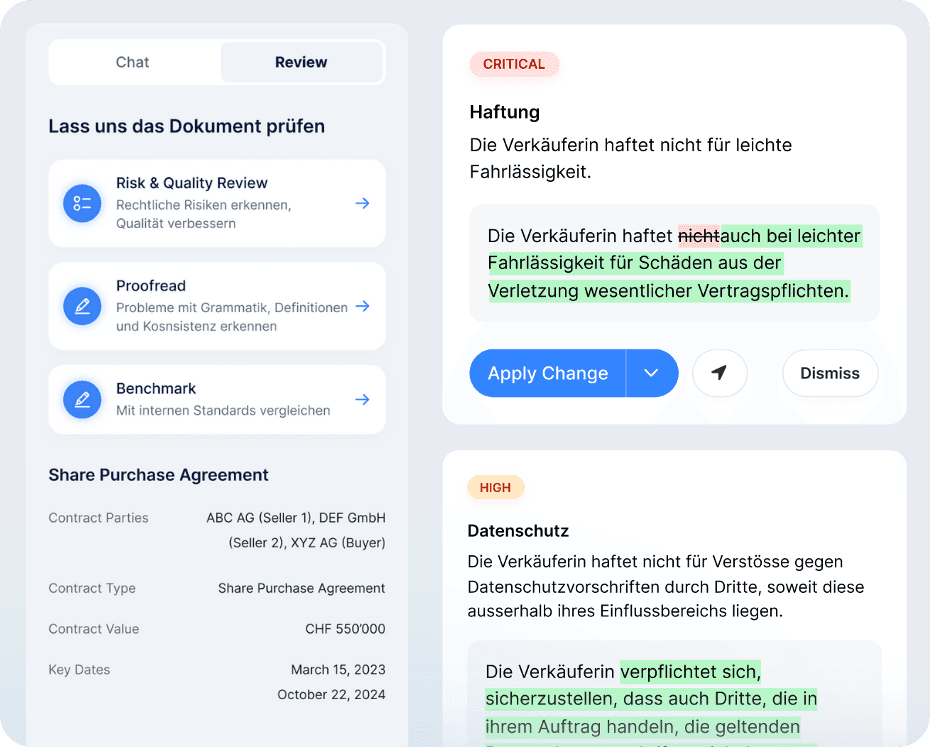
AI can help by providing faster orientation. A strong review output prioritizes risks, points to the relevant passages, and briefly explains why an issue may be problematic. Ideally, it also provides a clean alternative, or at least a direction for improving the clause. This saves time and reduces the risk that critical issues get lost in long versions – especially in parallel deals or with multiple reviewers.
Proofreading: references, definitions, consistency
Many of the costliest errors are craftsmanship issues: inconsistent definitions, broken cross-references, duplicated terms, or numbering mistakes after multiple edit rounds. These issues typically appear exactly when speed matters and multiple people are working on the same document.
Professional proofreading in a contract context means more than grammar. It covers definition consistency, references and cross-links, numbering and structure, and detecting contradictions between clauses. The practical advantage is that typical sources of error become visible before a document circulates internally or externally. That reduces follow-up questions, avoids unnecessary loops, and increases confidence when finalizing.
Document chat: questions, summaries
A document chat is valuable when it truly works on the specific document. It helps you find information quickly and produce clean summaries without manually scrolling through 40 pages.
Practical examples include questions about notice periods, liability exclusions, change of control, or a compact overview of each party’s obligations. The value is speed and clarity. To keep it legally robust, the chat should support answers with pinpoint citations or references to the exact passages. Otherwise a risk emerges: plausible answers without evidence are hard to use in practice.
Drafting and inserting clauses (in Word)
In law firms, writing a clause is rarely the main problem. The real time sink is fitting it in: in the right place, in the right style, with consistent terminology, and without breaking the Word structure.
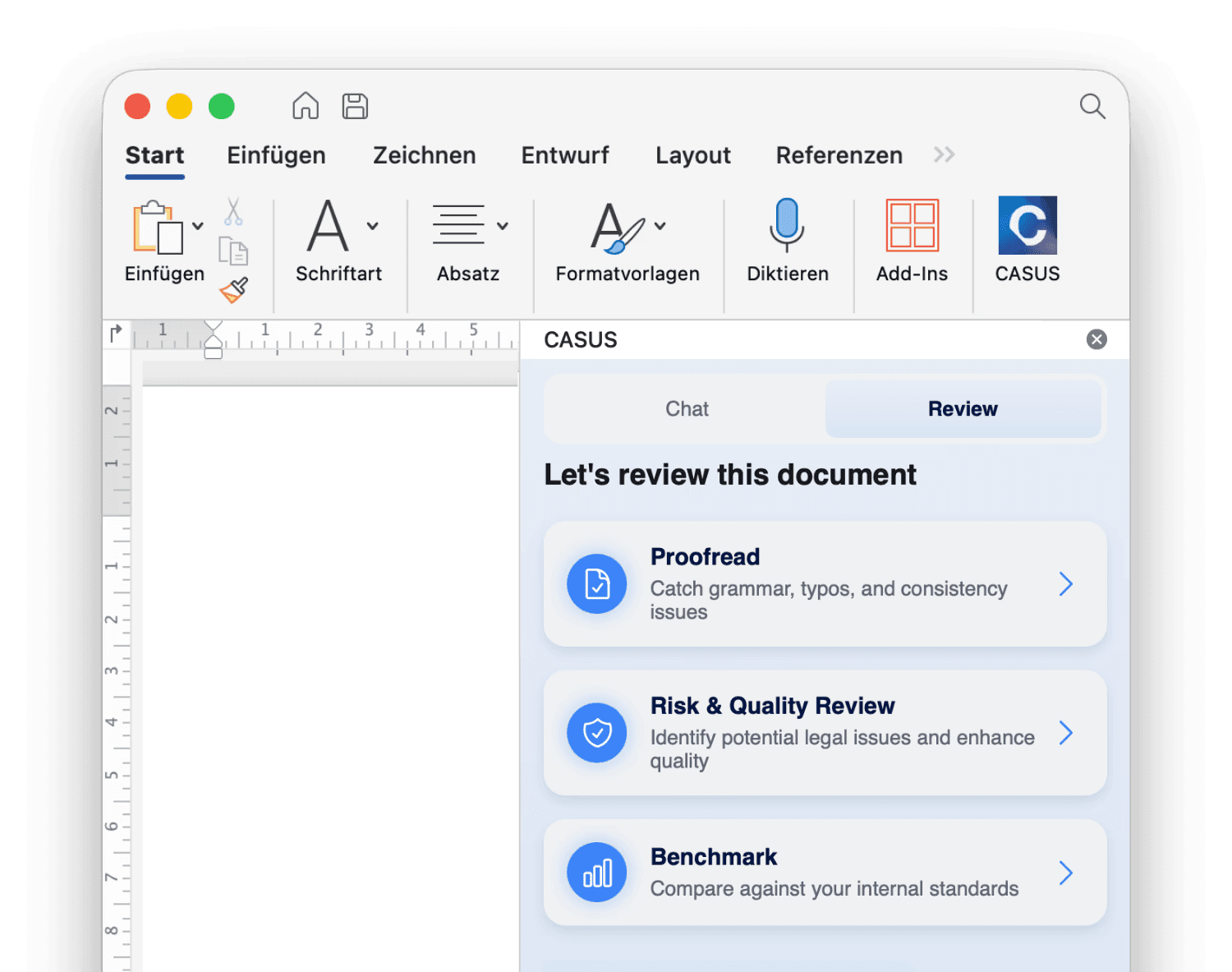
AI can be strong here if it does not only generate text, but integrates changes cleanly into the word workflow. This includes standard clauses, alternative negotiation language, or small additions that must be aligned with existing definitions and structure. The closer the tool operates to the document, the less rework is needed and the lower the error risk around numbering and references.
Legal research with sources
AI-based research can save lawyers time if it produces structured results and clearly identifies the relevant sources. What matters is not whether an answer sounds good, but whether it holds up.
A solid research workflow starts with a precise question including jurisdiction and context. The AI structures possible argument lines and points to statutes, case law, or literature. Then you verify the key passages in the original sources. Without sources, legal research is often too risky for professional work, especially for liability-relevant questions.
Due diligence and data rooms: tables, extraction, comparison
In due diligence and compliance, the bottleneck is often not legal assessment, but sheer volume. Information must be extracted consistently across many documents, such as terms, termination rights, liability caps, governing law, or assignment.
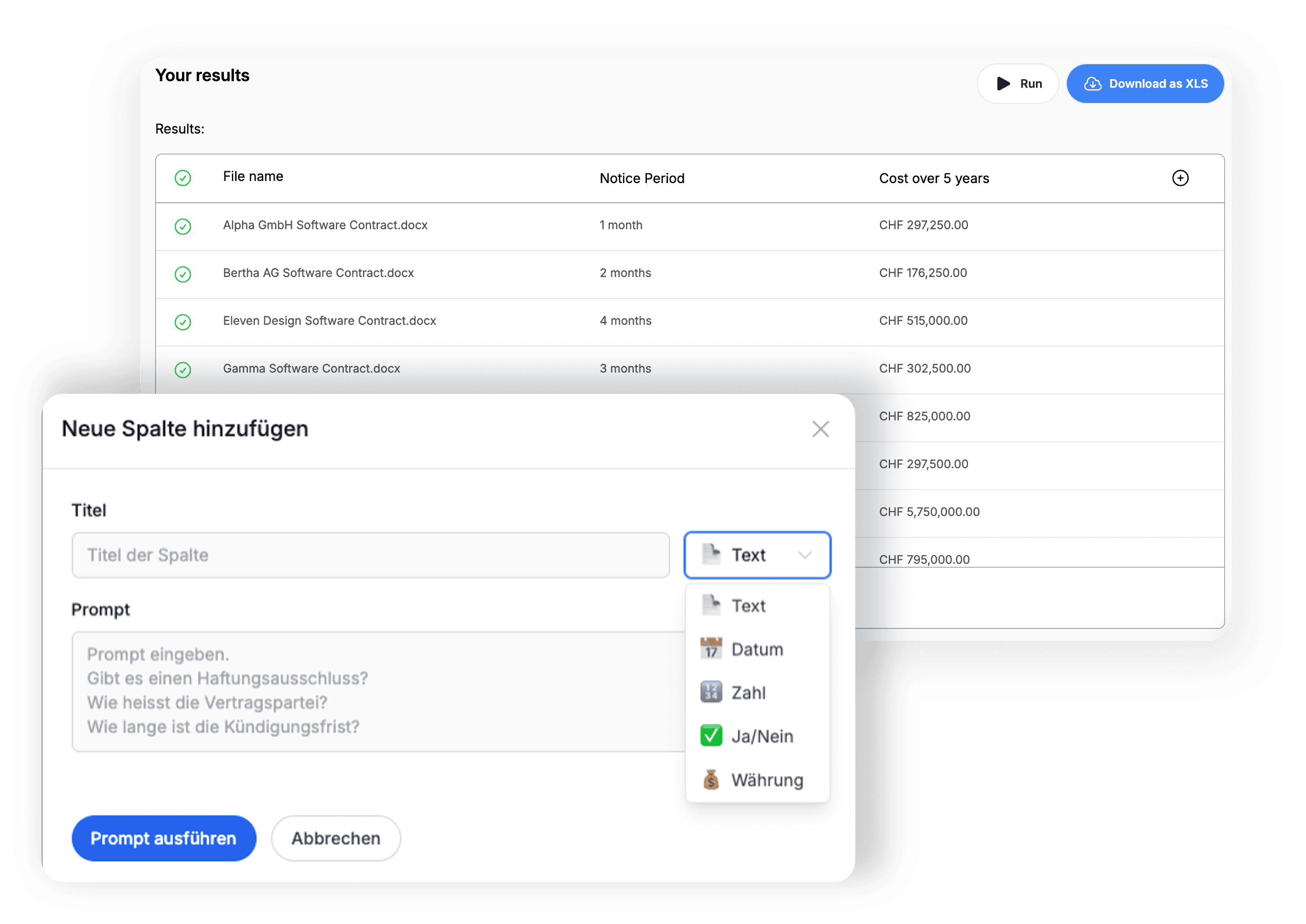
AI can accelerate this by outputting extractions in table form and making documents comparable. It is important that it remains traceable which document and which passage a data point comes from. Value is created when the team does not have to read every document from start to finish, but can focus on outliers and high-risk cases.
Emails and client communication
Client experience in a law firm often means fast, clear, professional. AI can help translate complex content into clean communication, such as concise assessments, structured summaries, or email drafts that present risks and options in an understandable way. Especially after a review, it helps if many detail points can quickly become a clear, readable status update for clients or internal stakeholders.
This reduces follow-up questions, speeds up decisions, and signals quality externally. Particularly at the interface between legal and business, this is a real lever, because legal content often needs to be translated into decision-ready form.
Executive summary instead of a wall of text: 3–5 key points, prioritized by risk and impact.
Present options clearly: “Option A/B” with a short consequence (risk, effort, negotiation need).
Define next steps: What must be decided or delivered, by when, by whom.
Adjust tone and level of detail: depending on the recipient (partner, client, procurement, sales) shorter or more detailed.
Team consistency: same structure and terminology across multiple emails and reviewers so communication stays professional.
Data protection and attorney–client privilege: the key points
For AI in law firms, data protection is not an extra item – it is the foundation. If the setup is not right, adoption is either not possible at all or it pushes teams, for convenience, toward public tools – and that is exactly how shadow IT happens.
The first question is where data is stored and processed. It makes a difference whether content stays within Switzerland or the EU, which sub-processors are involved, and whether data is transferred to third countries. The second question is what data is generated in the first place: not only contract content, but also metadata, logs, user identifiers, or document names. In practice, this metadata is often underestimated.
Another central point is training and retention. Lawyers need to know whether content can be used to improve models, whether a zero data retention option exists, and how long data remains available from a technical or organizational perspective. Then there is access control: roles, permissions, matter separation, admin access, and auditability. Who can see what in a pinch, who can use export functions, and how do you ensure client data does not end up in the wrong hands?
For law firms, attorney–client privilege adds another layer. It is not enough for a tool to “seem secure” in general. You need clear statements on data flows, hosting, contractual basis, technical and organizational measures, and whether and how external AI providers are involved. The more transparent the setup, the easier it is for a firm to take internal responsibility for what is allowed and what is not.
In practice, a simple guideline works well: do not ban AI – enable it in a controlled way. If teams do not have an official solution, they will often experiment anyway. An approved, secure environment with clear rules reduces risk while increasing real adoption.
FAQ: 10 common questions about AI for lawyers
Is AI for law firms allowed at all?
In principle, yes – but it strongly depends on the setup. The key factors are data protection and confidentiality (DSG and GDPR), compliance with attorney–client privilege, and clear contracts with providers on storage, processing, and training. You also need internal policies that define which documents may be processed in which tools.
Will AI replace lawyers?
No. AI mainly accelerates preparation and quality control, for example structuring, summarizing, or detecting inconsistencies. Legal assessment, strategic judgment, and responsibility always remain with humans – AI is an assistive tool, not a decision-maker.
How do I prevent hallucinations?
Prefer document-based AI and require citations or clear references to relevant passages. For legal research, sources (statutes, decisions, literature) should be named and the key passages verified. Clear prompts, fixed output formats, and consistent human review before anything is shared also help.
Where is the fastest ROI?
AI pays off fastest on recurring, text-heavy tasks: routine reviews, consistency checks, executive summaries, and standard clauses. Due diligence and contract portfolio analysis also benefit because AI can extract and structure information from many documents in parallel. ROI usually shows up as less rework and shorter cycle times.
What is better: a chatbot or a Word-based workflow?
For day-to-day law firm work, a Word-based workflow is often more efficient because placement, formatting, and versioning otherwise cost unnecessary time. If changes can be applied directly in the document, you reduce copy-paste and common formatting errors. A chatbot is still useful when the primary goal is quick questions, summaries, or explanations.
Which data am I allowed to enter?
Only data where you truly understand the data flows, storage locations, and contractual basis. Without a clean security setup, you should not process confidential client content, especially not in public tools.
How do I get the team to use it?
Start small with 1–2 clear use cases that visibly save time, and define a simple approach everyone can follow. Teams adopt tools more readily when they work inside the existing workflow and do not add extra steps. Short internal guidelines and examples of what “good output” looks like also help.
How long does implementation take?
A pilot can start very quickly, often within hours or days – depending on whether tooling and access are already in place. The real work begins when scaling: standards, roles, guidelines, approval processes, and potentially integrations. Realistically, it takes a few weeks until usage becomes stable and consistent across the team.
What is shadow IT in a legal context?
Shadow IT means employees use unofficial tools because they are faster or more convenient – often without control over data flows. In legal work, this is especially risky because confidential documents, metadata, or client information may quietly go to third parties. The best countermeasure is usually not a ban, but officially approved, secure tooling with clear rules.
Which teams benefit first?
Teams with high document volume, many versions, and recurring standards benefit most – for example small and mid-sized firms or in-house teams with large backlogs. The effect is particularly strong for NDAs, DPAs, MSAs, and other standard contracts, because patterns and checklists work well. Teams with tight resources also gain quickly because AI frees up capacity without immediately requiring new hires.